


AI Remodel - Interior Design
4.6998.00 Reviews
App Specs
- Version
- 1.35.2
- Updated On
- License
- Free
- Downloads
- 5,000,000+
- Developer
- PulseApps Solutions OÜ
- Categories
- House & Home
- Platform
- Android
Screenshots


 Analysis by AppCompare
When I am deciding whether to try a room-planning app, I want to know what it can help me decide before I spend time photographing a space or imagining a renovation. AI Remodel - Interior Design is aimed at that early, visual part of home projects: it helps you explore possible changes to a room, rather than replacing the practical work of measuring, budgeting, or hiring a tradesperson. I find that distinction useful. It is best approached as a way to test ideas and narrow down what you like, not as a final blueprint for construction.
First Impressions and Features
Opening up AI Remodel - Interior Design feels like unlocking a treasure trove of possibilities. The app boasts a clean, intuitive interface that even your tech-challenged friends could navigate with ease. It’s all about giving you the tools to reimagine your space with a few taps and swipes.
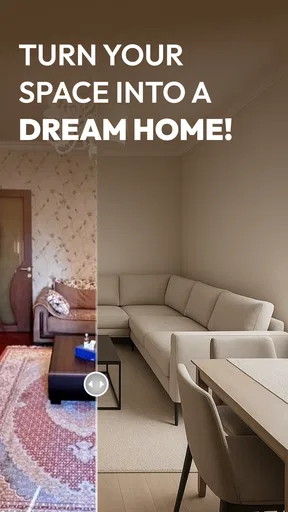
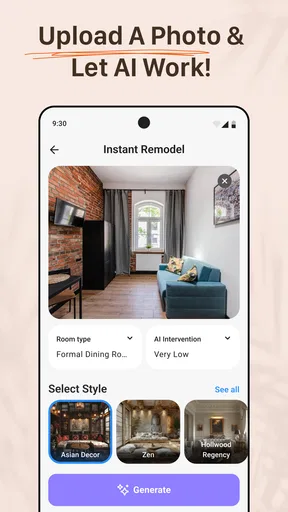
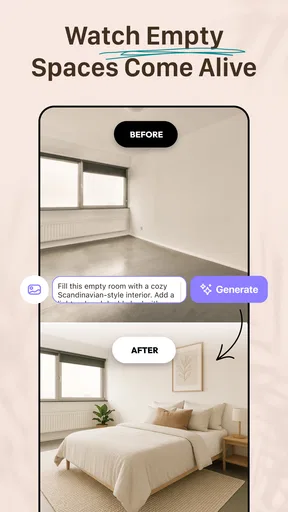
One standout feature is the ability to snap a picture of your room and then virtually redesign it. Imagine being able to change the color of your walls or swap out your furniture without lifting a finger! This feature is powered by some pretty cool AI tech that seamlessly integrates proposed changes into your existing space. It’s like having a personal interior designer in your pocket.
What to Decide Before You Start
I would first ask what kind of decision you are trying to make. If you are choosing between a warmer wall color and a cooler one, or trying to picture whether a room should feel calmer or more contemporary, a photo-based redesign can make the options easier to compare. If you need exact dimensions, a construction drawing, or a dependable estimate of materials, this is the wrong stage of the process to rely on an AI visualizer. It can help you decide what to investigate; it cannot make the physical room conform to a generated image.
Before taking a picture, I would tidy only the parts that make the room hard to read, then stand where the main furniture and walls are visible. Keep the camera angle consistent when you compare ideas. That small habit matters: changing the viewpoint between attempts can make a design seem better or worse simply because the room is framed differently. I would also take a second image from another corner if the first view hides an awkward doorway, window, or fixed feature that will affect the decision.
Think of the first few designs as a conversation starter with yourself, not a shopping list. Save or note the options that feel promising, then look at them beside the colors and objects you already own. A digitally attractive room can still be a poor fit if it clashes with a rug you plan to keep or makes a narrow route feel crowded. The most helpful question is not “Would I like this picture?” but “Would this change solve the specific problem I have in this room?”
The User Experience
Using the app is a breeze. I spent a good couple of hours playing around with different styles and settings, and it never felt overwhelming. The app guides you through each step, from choosing color palettes to selecting furniture pieces. Plus, the suggestions it offers are surprisingly spot-on, aligning well with the current trends.
Worth Reading Before You Choose

Baby Panda World Brings Quick Play to Modern Phones, but Its Game Library Feels Busy

ESPN’s Live Game View Makes Following Close Games Easier

QuizzLand Review: A Good Fit for Short Trivia Breaks, Not Every Player

Basketball Stars: Multiplayer Is Fast, but Can It Recover When Matches Go Wrong?

WEBTOON Turns Phone Updates Into a Better Reading Routine

Link to Windows Runs on Shared Habits, Not Social Feeds
What I particularly loved is the drag-and-drop functionality, which makes rearranging layouts as simple as moving items on your smartphone screen. This feature is perfect for those of us who need to see things in action rather than just envision them in our heads.
A More Useful Way to Compare Ideas
For a realistic everyday use, imagine that I am considering replacing a sofa but have not settled on the room’s overall direction. I would photograph the living room, try a few visual approaches, and use the results to decide whether the existing wall color still works with the kind of furniture I want. Then I would check the real sofa dimensions separately and compare them with the room measurements. The image helps me choose a direction; measuring and checking the actual product helps me avoid an expensive mismatch.
I would change one major visual choice at a time when possible. If a generated version changes the wall treatment, furniture, and general mood all at once, it can be hard to tell which change made the room feel right. A more controlled comparison—first exploring the look, then testing a furniture direction—gives clearer feedback. This is especially useful when you are sharing ideas with a partner or housemate: you can discuss a concrete visual difference rather than trying to translate vague descriptions like “a bit brighter” into a purchase.
There is a trade-off with any photo-based AI redesign: the image is an interpretation, not a guarantee that every edge, proportion, or material will match the real room. I would be cautious about treating apparent clearance around doors or furniture as proof that a layout will work. Use the preview to spot preferences and questions, then verify anything involving fit, access, electrical work, plumbing, or construction in the real space.
Practical Applications
Beyond just playing around, AI Remodel - Interior Design is genuinely useful for anyone considering a home makeover. Whether you’re tackling a full-scale renovation or just pondering a new sofa, the app gives you a realistic preview of how changes will look. This can save you both time and money, avoiding any "Oops, that doesn't look right" moments after a purchase.
Additionally, the app includes a catalog of real furniture and decor items that you can browse through. It’s like having a virtual shopping assistant who’s ready to help you find the perfect match for your style and budget.
Where It Fits Among Other Options
The usual alternatives are not all trying to solve the same problem. A mood board or saved-photo collection is better when I want to gather inspiration from many rooms and compare colors or styles without tying them to my own space. A conventional floor-planning tool is a better fit when accurate dimensions and a measured layout are the priority. Visiting a showroom can answer questions about the feel and finish of a real item, while a designer or contractor is the better choice for advice that must account for building constraints.
This app sits between inspiration and a professional plan. Its appeal is that I can start with a picture of my room and explore visual possibilities in context, rather than mentally mapping a reference image onto my own walls. That makes it particularly handy when I am undecided about a direction. The trade-off is that a polished-looking preview can feel more certain than it is, so I would not use it as proof that a piece will fit or that a renovation is technically feasible.
The furniture and decor catalog can help turn a general idea into something more concrete, but I would still check the item’s real-world details before buying. A catalog image is useful for narrowing the look; it does not replace checking dimensions, materials, delivery arrangements, or whether the item suits the way the room is used. If shopping is not part of your decision, you can still use the visual side to think through the room, but the catalog is most valuable when you are already considering specific decor choices.
Who Should Use It—and Who Should Look Elsewhere
I would recommend trying it if you are a renter planning low-commitment updates, a homeowner weighing different room styles, or someone who finds it hard to visualize color and furniture changes from samples alone. It can also help a household get on the same page before anyone starts buying paint or moving large pieces. The strongest use is turning “I’m not sure” into a few visual directions that can be discussed and checked.
I would skip it as the main tool if your project depends on precise measurements, a detailed floor plan, structural decisions, or a reliable quotation. People who already know exactly what they want and simply need to order a particular item may find a room redesign step unnecessary. Likewise, if you prefer to build a reference board from many real interiors rather than see one AI interpretation of your own room, a dedicated inspiration collection may suit you better.
For a larger remodel, I would use it early and then hand the useful decisions to the appropriate people: measure the room, confirm what can be changed, and discuss technical work with a qualified professional. For a small refresh, it can be enough to help settle a palette or decide whether a furniture direction feels worth pursuing. The scale of the project changes how much confidence I would place in the preview, not whether it can be useful.
Cost, Access, and the Effort of Switching
The app is free to download, with in-app purchases listed from $5.99 to $49.99 per item. I would explore the basic workflow before paying for anything and check the purchase details shown in the app at the time. A casual user who only needs to test a few ideas should be especially clear about what is available without a purchase; someone planning several rooms may value additional options enough to consider a paid item, but I would decide only after seeing how well the app handles the space and choices that matter to me.
Moving from a general inspiration tool to this app does not require abandoning your existing references. Keep useful photos, paint notes, and measurements separately, then use the room preview to test how a direction might look in context. If you later move to a measured planner or work with a professional, those notes remain useful, but do not assume the generated image itself can serve as a technical handoff. The practical switching cost is mainly the time spent setting up and comparing ideas, so start with one room and one clear question rather than trying to redesign the whole home at once.
Practical Details and Expectations
AI Remodel - Interior Design is a House & Home app from Dmytro Bubela. It is free to install, is rated for Everyone, and has an average rating of 4.3 from around 24,000 ratings; it has been installed over a million times. The current version is 1.16.2, and it requires Android 7.0 or later. Those details make it accessible to a broad range of Android users, while the in-app purchase range is worth keeping in mind if you intend to explore beyond the free experience.
It has been available since May 16, 2025, and has 156 written reviews. I would treat the average rating as a useful sign that many people find it worthwhile, not as a promise that every room or design request will produce a result I would use unchanged. For a home app, the best test is personal: try a space you know well, look carefully at what the visual changes preserve, and judge whether the result helps you make a real decision.
Final Thoughts
All in all, AI Remodel - Interior Design is a fantastic tool for anyone interested in giving their living space a facelift. It’s user-friendly, packed with features, and genuinely helpful in visualizing changes before they happen. Whether you're a design enthusiast or just someone looking to spruce up your home, this app is definitely worth a download.
So, if you’ve got a case of the interior design bug, why not give AI Remodel - Interior Design a try? You might just find yourself inspired to start that home project you’ve been dreaming about!
My recommendation is straightforward: use it to explore and compare, then verify every important choice outside the preview. If you want a low-friction way to picture possible changes in your own room, it is worth trying. If you need measurements, technical certainty, or professional renovation guidance, pair it with tools and people built for those jobs instead.
Pros
- User-friendly interface for quick learning
- Wide range of design templates available
- AI suggestions improve over time
- Seamless integration with smart home apps
- High-quality 3D visualizations
Cons
- Limited free features in basic version
- Occasional lag on older devices
- Requires stable internet connection
- High battery consumption during use
- In-app purchases can be pricey
FAQs for AI Remodel - Interior Design
What is AI Remodel - Interior Design and how does it work?
AI Remodel - Interior Design is an innovative app that helps users visualize interior design changes using AI technology. Users can upload images of their rooms, and the app generates design suggestions, including furniture placement, color schemes, and decor ideas. This allows users to experiment with different styles before making physical changes.
Is AI Remodel - Interior Design suitable for professional designers?
Yes, AI Remodel - Interior Design is suitable for both professional designers and casual users. Professionals can use the app to quickly generate design concepts for clients, while casual users can explore various design options for personal projects. Its user-friendly interface makes it accessible to all skill levels.
What are the key features of AI Remodel - Interior Design?
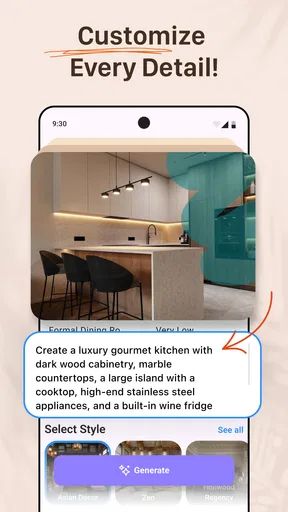
The app offers several features, including AI-generated design suggestions, customizable design elements, a library of furniture and decor items, and virtual room visualization. Users can also save and share their designs, making it easy to collaborate with others or seek feedback on their ideas.
Does AI Remodel - Interior Design require an internet connection?
Yes, an internet connection is necessary to use AI Remodel - Interior Design. The app relies on cloud-based AI processing to generate design suggestions and updates its library of design elements regularly. This ensures users have access to the latest trends and a wide range of options.
Are there any costs associated with using AI Remodel - Interior Design?
AI Remodel - Interior Design offers a free version with basic features, while premium features and access to a broader design library may require a subscription or one-time purchase. Pricing details can vary, so users are encouraged to check the app store for the latest information on costs and subscription options.


